
Die Bibliothek Adafruit_SH110X kann ebenso wie die Bibliothek ⇒u8g2 Grafik und Text darstellen.

Allerdings kann sie nur mit dem Chipsätzen SH1106 und SH1107 verwendet werden.
⇒Anschluss eines OLED an verschiedene Mikrocontroller
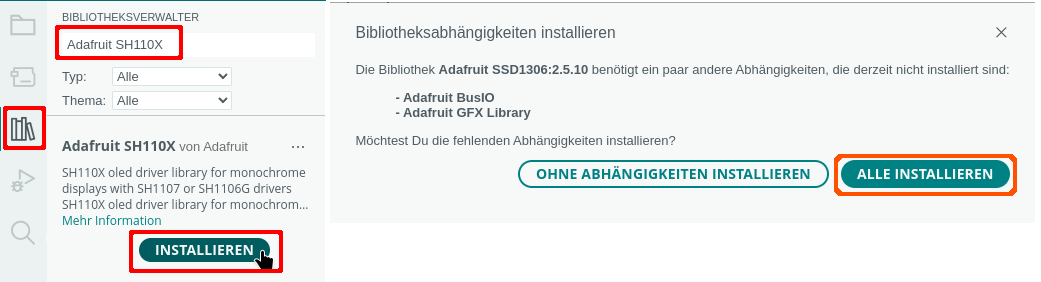
Benötigte Bibliothek:
Achte darauf, dass du auch die abhängigen Bibliotheken installierst.
Funktionen der Bibliothek Adafruit_SH110X
| Schlüsselwort | Parameter | Aktion |
|---|---|---|
| begin(Parameter); | SSD1306_SWITCHCAPVCC, Adresse in Hexadezimal | OLED starten |
| width(); | Bildschirmbreite feststellen | |
| height(); | Bildschirmhöhe feststellen | |
| clearDisplay(); | Bildschirm löschen | |
| fillScreen(Farbe); | Bildschirmhintergrundfarbe festlegen | |
| drawPixel(x-Achse, y-Achse, Farbe) | Farbe: SH110X_WHITE SH110X_BLACK | einzelnen Pixel zeichnen |
| disolay(); | Bildschirm anzeigen | |
| drawLine(StartX, StartY, EndeX, EndeY, Farbe); | Farbe: SH110X_WHITE SH110X_BLACK | Linie zeichnen |
| drawFastVLine(StartX, StartY, Breite, Farbe); | Farbe: SH110X_WHITE SH110X_BLACK | Vertikale Linie zeichnen |
| drawFastVLine(StartX, StartY, Breite, Farbe); | Farbe: SH110X_WHITE SH110X_BLACK | Horizontale Linie zeichnen |
| drawRect(StartX, StartY,, Breite, Höhe, Farbe); | Farbe: SH110X_WHITE SH110X_BLACK | Rechteck zeichnen |
| drawRoundRect(StartX, StartY , Breite, Höhe, Eckenradius, Farbe); | abgerundetes Rechteck zeichnen | |
| fillRect(StartX, StartY,, Breite, Höhe, Farbe); | ausgefülltes Rechteck zeichnen | |
| fillRoundRect(StartX, StartY , Breite, Höhe, Eckenradius, Farbe); | ausgefülltes, abgerundetes Rechteck zeichnen | |
| drawCircle(MittelpunkX, MittelpunktY, Radius, Farbe); | Farbe: SH110X_WHITE SH110X_BLACK | Kreis zeichnen |
| fillCircle(MittelpunkX, MittelpunktY, Radius); | Ausgefüllten Kreis zeichnen | |
| setCursor(x-Achse, y-Achse); | Cursor setzen | |
| setTextSize(); | Textgröße | |
| print("Text"); | Text schreiben | |
| write(Zeichen) | einzelnes Zeichen schreiben | |
| invertDisplay(true/false); | Farben tauschen true = weißer Hintergrund false = schwarzer Hintergrund |
So sieht es aus:
|
1 2 3 4 5 6 7 8 9 10 11 12 13 14 15 16 17 18 19 20 21 22 23 24 25 26 27 28 29 30 31 32 33 34 35 36 37 38 39 40 41 42 43 44 45 46 47 48 49 50 51 52 53 54 55 56 57 58 59 60 61 62 63 64 65 66 67 68 69 70 71 72 73 74 75 76 77 78 79 80 81 82 83 84 85 86 87 88 89 90 91 92 93 94 95 96 97 98 99 100 101 102 103 104 105 106 107 108 109 110 111 112 113 114 115 116 117 118 119 120 121 122 123 124 125 126 127 128 129 130 131 132 133 134 135 136 137 138 139 140 141 142 143 144 145 146 147 148 149 150 151 152 153 154 155 156 157 158 159 160 161 162 163 164 165 166 167 168 169 170 171 172 173 174 175 176 177 178 179 180 181 182 183 184 185 186 187 188 189 190 191 192 193 194 195 196 197 198 199 200 201 202 203 204 205 206 207 208 209 210 211 212 213 214 215 216 217 218 219 220 221 222 223 224 225 226 227 228 229 230 231 232 233 234 235 236 237 238 |
#include "Adafruit_SH110X.h" #include "Adafruit_GFX.h" // Maße des Bildschirms #define BildschirmBreite 128 // 1,3 Zoll #define BildschirmHoehe 64 // 1,5 Zoll #define BildschirmHoehe 128 // Name des Displays und Startparameter #define Adresse 0x3c #define OLED_RESET 4 // SH1106 Adafruit_SH1106G oled = Adafruit_SH1106G(BildschirmBreite, BildschirmHoehe, &Wire, OLED_RESET); // SH1107 // Adafruit_SH1107 oled = Adafruit_SH1107(BildschirmBreite, BildschirmHoehe, &Wire, OLED_RESET); void setup() { // OLED starten oled.begin(Adresse, true); // Bildschirm löschen oled.clearDisplay(); // Schriftfarbe oled.setTextColor(SH110X_WHITE); // Textgröße (1-3) oled.setTextSize(2); // Codepage auf 437 setzen -> Sonderzeichen anzeigen oled.cp437(true); } void loop() { // ausgefüllte Kreise von links nach rechts int Radius = 3; // Start am linken Rand int StartX = Radius; int StartY = 5; while (StartX < oled.width() - Radius) { for (int i = StartY; i < oled.height() - Radius; i += 10) { oled.fillCircle(StartX, i, Radius, SH110X_WHITE); oled.display(); delay(1); } StartX += 10; } delay(1000); oled.clearDisplay(); // ausgefüllte Kreise von rechts nach links // Start am rechten Rand StartX = oled.width() - Radius; StartY = 5; // solange der linke Rand nicht erreicht wurde while (StartX > Radius) { for (int i = StartY; i < oled.height() - Radius; i += 10) { oled.fillCircle(StartX, i, Radius, SH110X_WHITE); oled.display(); delay(10); } // 10 Pixel weiter nach links StartX -= 10; } delay(1000); oled.clearDisplay(); // Kreise Radius = 5; StartX = Radius; while (StartX < oled.width() - Radius) { for (int i = StartY; i < oled.height() - Radius; i += 15) { oled.drawCircle(StartX, i, Radius, SH110X_WHITE); oled.display(); delay(1); } StartX += 15; } delay(1000); oled.clearDisplay(); // diagonale Linien for (int i = 0; i < oled.width(); i += 4) { oled.drawLine(0, 0, i, oled.height() - 1, SH110X_WHITE); oled.display(); delay(1); } for (int i = 0; i < oled.height(); i += 4) { oled.drawLine(0, 0, oled.width() - 1, i, SH110X_WHITE); oled.display(); delay(1); } delay(1000); oled.clearDisplay(); // horizontale Linie mit drawLine for (int i = 0; i < oled.height() - 1; i += 4) { oled.drawLine(0, i, oled.width() - 1, i, SH110X_WHITE); oled.display(); delay(1); } oled.clearDisplay(); delay(1000); // horizontale Linien mit drawFastHLine for (int i = 0; i < oled.height() - 1; i += 4) { oled.drawFastHLine(0, i, oled.width(), SH110X_WHITE); oled.display(); delay(1); } oled.clearDisplay(); delay(1000); // vertikale Linie mit drawLine for (int i = 0; i < oled.width() - 1; i += 4) { oled.drawLine(i, 0, i, oled.height() - 1, SH110X_WHITE); oled.display(); delay(1); } oled.clearDisplay(); delay(1000); // vertikale Linien mit drawFastVLine for (int i = 0; i < oled.width() - 1; i += 4) { oled.drawFastVLine(i, 0, oled.height(), SH110X_WHITE); oled.display(); delay(1); } oled.clearDisplay(); delay(1000); // Rechtecke for (int i = 0; i < oled.height() / 2; i += 4) { oled.drawRect(i, i, oled.width() - 2 * i, oled.height() - 2 * i, SH110X_WHITE); oled.display(); delay(10); } delay(1000); oled.clearDisplay(); // abgerundete Rechtecke for (int i = 0; i < oled.height() / 2; i += 4) { oled.drawRoundRect(i, i, oled.width() - 2 * i, oled.height() - 2 * i, 5, SH110X_WHITE); oled.display(); delay(10); } delay(1000); oled.clearDisplay(); // einzelne Pixel zufällig anordnen for (int i = 0; i < 1000; i++) { int x = random(1, oled.width()); int y = random(1, oled.height()); oled.drawPixel(x, y, SH110X_WHITE); delay(2); } oled.display(); delay(1000); oled.clearDisplay(); oled.setTextSize(2); oled.setCursor(0, 0); oled.print("Text"); oled.display(); delay(1000); oled.clearDisplay(); // Sonderzeichen oled.setCursor(0, 0); oled.print("Sonder-"); oled.setCursor(0, 15); oled.print("-zeichen:"); oled.display(); delay(1000); oled.clearDisplay(); oled.setCursor(0, 0); oled.write("\x84"); // ä -> 132 oled.write("\x94"); // ö -> 148 oled.write("\x81"); // ü -> 129 oled.write("\x8e"); // Ä -> 142 oled.write("\x99"); // Ö -> 153 oled.write("\x9a"); // Ü -> 154 oled.write("\xe1"); // ß -> 224 oled.write("\xe0"); // alpha -> 223 oled.write("\xe4"); // Summenzeichen -> 228 oled.write("\xe3"); // PI -> 227 oled.write("\xea"); // Ohm -> 234 oled.write("\xed"); // Durchschnitt -> 237 oled.write("\xee"); // € -> 238 oled.write("\x10"); // Pfeil links -> 16 oled.write("\x11"); // Pfeil rechts -> 17 oled.write("\x12"); // Pfeil oben und unten -> 18 oled.write("\x7b"); // { -> 123 oled.write("\x7c"); // | -> 124 oled.write("\x7d"); // } ~ -> 125 oled.write("\xf8"); // ° -> 248 oled.display(); delay(2000); oled.clearDisplay(); // Farben tauschen oled.invertDisplay(true); oled.setCursor(0, 0); oled.print("Text"); oled.display(); delay(1000); oled.clearDisplay(); oled.invertDisplay(false); } |
Schriften verwenden
So sieht es aus:
|
1 2 3 4 5 6 7 8 9 10 11 12 13 14 15 16 17 18 19 20 21 22 23 24 25 26 27 28 29 30 31 32 33 34 35 36 37 38 39 40 41 42 43 44 45 46 47 48 49 50 51 52 53 54 55 56 57 58 59 60 61 62 63 64 65 66 67 68 69 70 71 72 73 74 75 76 77 78 79 80 81 82 83 84 85 86 87 88 89 90 91 92 |
#include "Adafruit_SH110X.h" #include "Adafruit_GFX.h" // alle Schriftarten einbinden #include "Fonts/FreeMono9pt7b.h" #include "Fonts/FreeMono12pt7b.h" #include "Fonts/FreeMono18pt7b.h" #include "Fonts/FreeMono24pt7b.h" #include "Fonts/FreeMonoBold9pt7b.h" #include "Fonts/FreeMonoBold12pt7b.h" #include "Fonts/FreeMonoBold18pt7b.h" #include "Fonts/FreeMonoBold24pt7b.h" #include "Fonts/FreeMonoBoldOblique9pt7b.h" #include "Fonts/FreeMonoBoldOblique12pt7b.h" #include "Fonts/FreeMonoBoldOblique18pt7b.h" #include "Fonts/FreeMonoBoldOblique24pt7b.h" #include "Fonts/FreeMonoOblique9pt7b.h" #include "Fonts/FreeMonoOblique12pt7b.h" #include "Fonts/FreeMonoOblique18pt7b.h" #include "Fonts/FreeMonoOblique24pt7b.h" #include "Fonts/FreeSans9pt7b.h" #include "Fonts/FreeSans12pt7b.h" #include "Fonts/FreeSans18pt7b.h" #include "Fonts/FreeSans24pt7b.h" #include "Fonts/FreeSansBold9pt7b.h" #include "Fonts/FreeSansBold12pt7b.h" #include "Fonts/FreeSansBold18pt7b.h" #include "Fonts/FreeSansBold24pt7b.h" // Maße des Bildschirms #define BildschirmBreite 128 #define BildschirmHoehe 64 // Name des Displays und Startparameter #define Adresse 0x3c #define OLED_RESET 4 Adafruit_SH1106G oled = Adafruit_SH1106G(BildschirmBreite, BildschirmHoehe, &Wire, OLED_RESET); void setup() { // OLED starten oled.begin(Adresse, true); // Bildschirm löschen oled.clearDisplay(); // Schriftfarbe und -größe oled.setTextColor(SH110X_WHITE); } void loop() { oled.setFont(&FreeMono9pt7b); oled.setCursor(0, 10); oled.print("Text"); oled.display(); delay(1000); oled.clearDisplay(); oled.setFont(&FreeMono12pt7b); oled.setCursor(0, 15); oled.print("Text"); oled.display(); delay(1000); oled.clearDisplay(); oled.setFont(&FreeMono24pt7b); oled.setCursor(0, 30); oled.print("Text"); oled.display(); delay(1000); oled.clearDisplay(); oled.setFont(&FreeSansBold24pt7b); oled.setCursor(0, 35); oled.print("Text"); oled.display(); delay(1000); oled.clearDisplay(); oled.setFont(&FreeMonoBoldOblique24pt7b); oled.setCursor(0, 35); oled.print("Text"); oled.display(); delay(1000); oled.clearDisplay(); } |
Letzte Aktualisierung: