
Überblick

Der ESP32-C3 Super Mini hat insgesamt 18 Pins, 3 dienen der Stromversorgung, es bleiben 15 Pins, die mehrfach belegt sind.
Er verfügt über Bluetooth und WiFi.
Board installieren
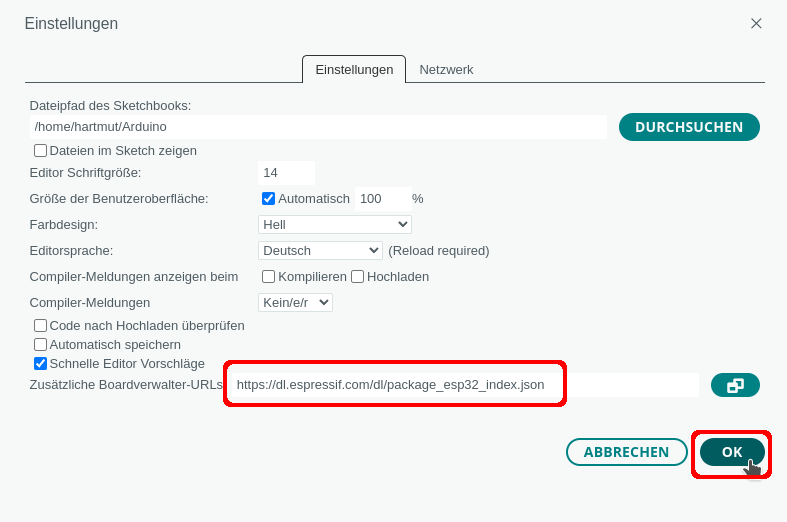
Trage unter Datei -> Einstellungen eine zusätzliche Boardverwalter-URL ein:
https://dl.espressif.com/dl/package_esp32_index.json
Board auswählen
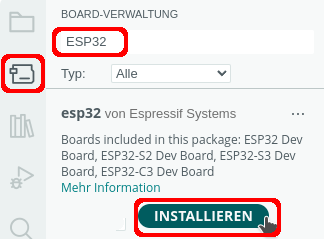
- Icon für den Boardverwalter anklicken oder Werkzeuge-> Board -> Boardverwalter
- nach ESP32 suchen
- Board installieren
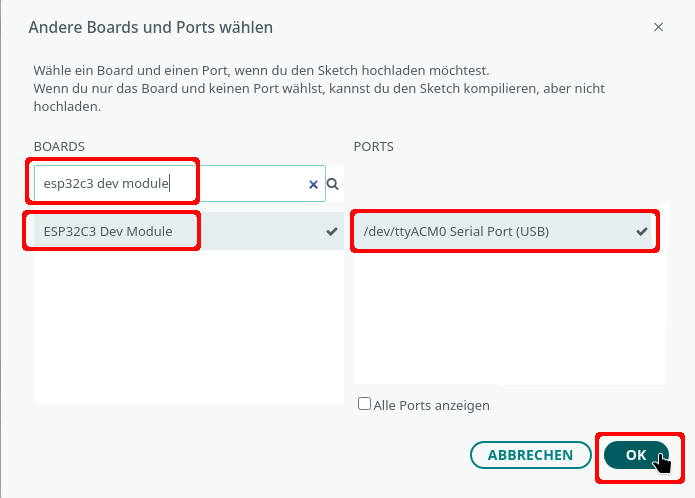
Wenn der ESP32-C3 nicht automatisch erkannt wurde, klicke auf „Wähle ein anderes Board und einen anderen Port“ und suche nach esp32c6. Je nach Betriebssystem wird der USB-Port eine andere Bezeichnung haben.
Seriellen Monitor einschalten
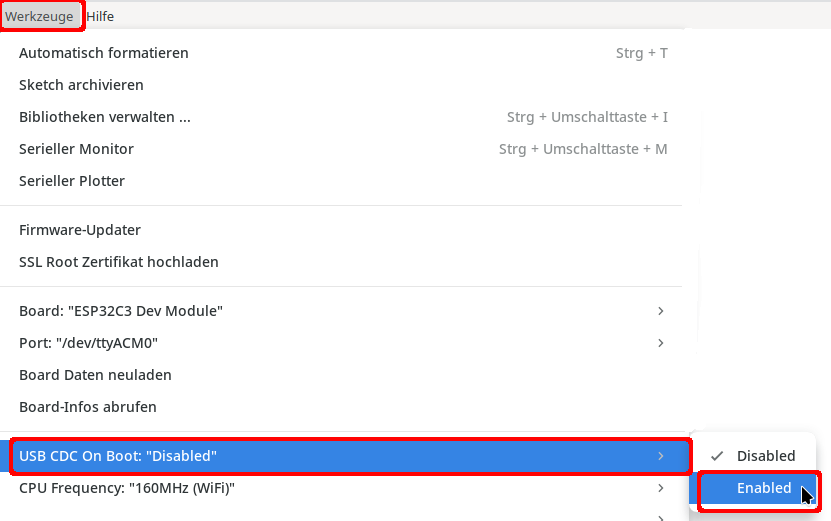
Der Serielle Monitor steht erst nach einer Änderung der Konfiguration zur Verfügung:
LED
Auf dem Board ist an Pin 8 eine blaue LED verbaut.
LOW -> LED leuchtet, HIGH -> LED ausgeschaltet
|
1 2 3 4 5 6 7 8 9 10 11 12 |
void setup() { pinMode(8, OUTPUT); } void loop() { digitalWrite(8, HIGH); delay(1000); digitalWrite(8, LOW); delay(1000); } |
Pinbelegung

I²C

⇒Info
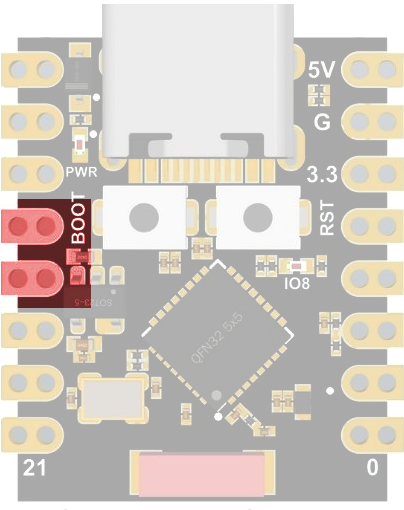
I²C-Pins
8 -> SDA
9 -> SCL
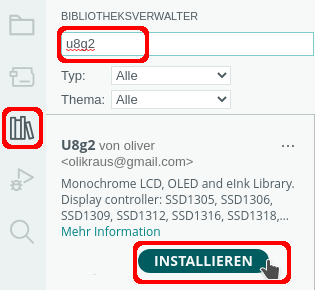
Beispiel 0,96 Zoll OLED

|
1 2 3 4 5 6 7 8 9 10 11 12 13 14 15 16 17 18 19 20 21 22 23 24 25 26 27 28 29 30 31 32 33 34 35 36 37 38 39 40 41 42 43 44 45 46 47 48 49 50 51 52 53 54 55 56 57 58 59 60 61 62 63 64 65 66 67 68 69 70 71 72 73 74 75 76 77 78 79 80 81 82 83 84 85 86 87 88 89 90 91 92 93 94 95 96 97 98 99 100 101 102 103 104 105 106 107 108 109 110 111 112 113 114 115 116 117 118 119 120 121 122 123 124 125 126 127 128 129 130 131 132 133 134 135 136 137 138 139 140 141 142 143 144 145 146 147 148 149 150 151 152 153 154 155 156 157 158 159 160 161 162 163 164 165 166 167 168 169 170 171 172 173 174 175 176 177 178 179 180 181 182 183 184 185 186 187 188 189 190 191 192 193 194 195 196 197 198 199 200 201 202 203 204 205 206 207 208 209 210 |
#include "U8g2lib.h" // 0,96 Zoll SSD1306 U8G2_SSD1306_128X64_NONAME_F_HW_I2C oled(U8G2_R0); // Bildschirmgröße int BildschirmBreite = oled.getDisplayWidth(); int BildschirmHoehe = oled.getDisplayHeight(); // Smiley XBM erstellt mit GIMP #define SmileyBreite 46 #define SmileyHoehe 45 static unsigned char Smiley[] = { 0x00, 0x00, 0xfe, 0x1f, 0x00, 0x00, 0x00, 0xc0, 0xff, 0xff, 0x00, 0x00, 0x00, 0xf0, 0x07, 0xf8, 0x03, 0x00, 0x00, 0xfc, 0x00, 0xc0, 0x0f, 0x00, 0x00, 0x3e, 0x00, 0x00, 0x1f, 0x00, 0x80, 0x0f, 0x00, 0x00, 0x7c, 0x00, 0xc0, 0x07, 0x00, 0x00, 0xf8, 0x00, 0xe0, 0x01, 0x00, 0x00, 0xe0, 0x01, 0xf0, 0x00, 0x00, 0x00, 0xc0, 0x03, 0x70, 0x00, 0x00, 0x00, 0x80, 0x03, 0x38, 0x7e, 0x00, 0x80, 0x1f, 0x07, 0x38, 0xff, 0x00, 0xc0, 0x3f, 0x07, 0x9c, 0xff, 0x01, 0xc0, 0x3f, 0x0e, 0x9c, 0xe7, 0x01, 0xc0, 0x39, 0x0e, 0x8e, 0xc3, 0x01, 0xc0, 0x30, 0x1c, 0x8e, 0xe3, 0x01, 0xc0, 0x31, 0x1c, 0x86, 0xf7, 0x01, 0xc0, 0x3b, 0x18, 0x87, 0xff, 0x01, 0xc0, 0x3f, 0x38, 0x07, 0xff, 0x00, 0x80, 0x3f, 0x38, 0x03, 0x7e, 0x00, 0x80, 0x1f, 0x30, 0x03, 0x00, 0x00, 0x00, 0x00, 0x30, 0x03, 0x00, 0x00, 0x00, 0x00, 0x30, 0x03, 0x00, 0x00, 0x00, 0x00, 0x30, 0x03, 0x00, 0x00, 0x00, 0x00, 0x30, 0x03, 0x00, 0x00, 0x00, 0x00, 0x30, 0x03, 0x00, 0x00, 0x00, 0x00, 0x30, 0x07, 0x00, 0x00, 0x00, 0x00, 0x38, 0x07, 0x20, 0x00, 0x00, 0x01, 0x38, 0x06, 0x70, 0x00, 0x80, 0x03, 0x18, 0x0e, 0xf0, 0x00, 0xc0, 0x01, 0x1c, 0x0e, 0xe0, 0x03, 0xf0, 0x01, 0x1c, 0x1c, 0xc0, 0x3f, 0xfc, 0x00, 0x0e, 0x1c, 0x80, 0xff, 0x7f, 0x00, 0x0e, 0x38, 0x00, 0xfc, 0x1f, 0x00, 0x07, 0x38, 0x00, 0xc0, 0x03, 0x00, 0x07, 0x70, 0x00, 0x00, 0x00, 0x80, 0x03, 0xf0, 0x00, 0x00, 0x00, 0xc0, 0x03, 0xe0, 0x01, 0x00, 0x00, 0xe0, 0x01, 0xc0, 0x07, 0x00, 0x00, 0xf8, 0x00, 0x80, 0x0f, 0x00, 0x00, 0x7c, 0x00, 0x00, 0x3e, 0x00, 0x00, 0x1f, 0x00, 0x00, 0xfc, 0x00, 0xc0, 0x0f, 0x00, 0x00, 0xf0, 0x07, 0xf8, 0x03, 0x00, 0x00, 0xc0, 0xff, 0xff, 0x00, 0x00, 0x00, 0x00, 0xfe, 0x1f, 0x00, 0x00 }; // Schneemann XBM erstellt mit GIMP #define SchneemannBreite 28 #define SchneemannHoehe 62 static unsigned char Schneemann[] = { 0x00, 0xf0, 0x01, 0x00, 0x00, 0xfc, 0x07, 0x00, 0x00, 0x0e, 0x06, 0x00, 0x00, 0x06, 0x0c, 0x00, 0x00, 0x02, 0x08, 0x00, 0x00, 0x03, 0x18, 0x00, 0x00, 0x03, 0x18, 0x00, 0x00, 0x03, 0x18, 0x00, 0x00, 0x03, 0x38, 0x00, 0xe0, 0xff, 0xff, 0x03, 0x00, 0xfe, 0x0f, 0x00, 0x00, 0x0f, 0x1e, 0x00, 0x80, 0x03, 0x1c, 0x00, 0x80, 0x01, 0x38, 0x00, 0xc0, 0x19, 0x37, 0x00, 0xc0, 0x1c, 0x37, 0x00, 0xc0, 0x18, 0x27, 0x00, 0xc0, 0x00, 0x20, 0x00, 0xc0, 0x08, 0x21, 0x00, 0xc0, 0xf9, 0x31, 0x00, 0xc0, 0xf1, 0x38, 0x00, 0x80, 0x03, 0x38, 0x00, 0x80, 0x07, 0x1c, 0x00, 0x00, 0x1f, 0x0f, 0x00, 0x00, 0xfc, 0x07, 0x00, 0x00, 0xfc, 0x03, 0x04, 0x00, 0xff, 0x0f, 0x06, 0x80, 0x07, 0x1e, 0x06, 0xc0, 0x03, 0x3c, 0x03, 0xe0, 0x00, 0x70, 0x03, 0xf0, 0x00, 0xf0, 0x01, 0x70, 0x00, 0xe0, 0x00, 0x38, 0x00, 0xc0, 0x01, 0x38, 0xf0, 0xc0, 0x01, 0x18, 0xf0, 0xe0, 0x01, 0x18, 0xf0, 0xb0, 0x01, 0x0c, 0x70, 0x30, 0x03, 0x0c, 0x00, 0x18, 0x03, 0x0c, 0x00, 0x18, 0x03, 0x0e, 0x00, 0x08, 0x07, 0x06, 0x00, 0x0f, 0x06, 0x06, 0x00, 0x0f, 0x06, 0x06, 0x30, 0x06, 0x06, 0x06, 0x70, 0x00, 0x06, 0x06, 0xf0, 0x00, 0x06, 0x06, 0xf0, 0x00, 0x06, 0x0e, 0x60, 0x00, 0x07, 0x0c, 0x00, 0x00, 0x03, 0x0c, 0x00, 0x00, 0x03, 0x0c, 0x00, 0x00, 0x03, 0x0c, 0x00, 0x00, 0x03, 0x18, 0x00, 0x80, 0x01, 0x38, 0x60, 0xc0, 0x01, 0x38, 0xf0, 0xc0, 0x01, 0x78, 0xf0, 0xe0, 0x00, 0xf0, 0xf0, 0xf0, 0x00, 0xf0, 0x00, 0x70, 0x00, 0xe0, 0x03, 0x7c, 0x00, 0xe0, 0x07, 0x3e, 0x00, 0xe0, 0xff, 0x3f, 0x00, 0xc0, 0xff, 0x1f, 0x00, 0x00, 0x00, 0x00, 0x00 }; void setup() { // Zufallsgenerator starten randomSeed(A0); // Display starten oled.begin(); // Kontrast maximal 255 oled.setContrast(200); } void loop() { // Farbe weiß oled.setDrawColor(1); // Smiley oled.clearBuffer(); oled.drawXBM(40, 10, SmileyBreite, SmileyHoehe, Smiley); oled.sendBuffer(); delay(2000); // Schneemann oled.clearBuffer(); oled.drawXBM(50, 1, SchneemannBreite, SchneemannHoehe, Schneemann); oled.sendBuffer(); delay(2000); // Pixelmuster oled.clearBuffer(); for (int i = 0; i < 500; i++) { int x = random(1, BildschirmBreite); int y = random(1, BildschirmHoehe); oled.drawPixel(x, y); } oled.sendBuffer(); delay(2000); oled.setFont(u8g2_font_unifont_t_symbols); // Text horizontal oled.clearBuffer(); oled.setFontDirection(0); oled.setCursor(2, BildschirmHoehe / 2); oled.print("Text"); oled.sendBuffer(); delay(2000); // Text 90 Grad gedreht oled.clearBuffer(); oled.setFontDirection(1); oled.setCursor(BildschirmBreite / 2, 2); oled.print("Text"); oled.sendBuffer(); delay(2000); // Text 180 Grad gedreht oled.clearBuffer(); oled.setFontDirection(2); oled.setCursor(BildschirmBreite - 2, BildschirmHoehe / 2); oled.print("Text"); oled.sendBuffer(); delay(2000); // Text 270 Grad gedreht oled.clearBuffer(); oled.setFontDirection(3); oled.setCursor(BildschirmBreite / 2, BildschirmHoehe - 2); oled.print("Text"); oled.sendBuffer(); delay(2000); // Kreise oled.clearBuffer(); for (int i = 2; i < BildschirmHoehe / 2; i += 3) { oled.drawCircle(BildschirmBreite / 2, BildschirmHoehe / 2, i); } oled.sendBuffer(); delay(2000); // Rahmen oled.clearBuffer(); for (int i = 2; i < BildschirmHoehe; i += 4) { oled.drawFrame(0, 0, i, i); } oled.sendBuffer(); delay(2000); // vertikale Linie oled.clearBuffer(); for (int i = 0; i < BildschirmBreite; i += 4) { oled.drawVLine(i, 0, BildschirmBreite - 1); } oled.sendBuffer(); delay(2000); // horizontale Linie oled.clearBuffer(); for (int i = 0; i < BildschirmHoehe; i += 4) { oled.drawHLine(0, i, BildschirmBreite - 1); } oled.sendBuffer(); delay(2000); // ausgefüllte Kreise oled.clearBuffer(); int Radius = 5; int StartX = 10; int StartY = 10; while (StartX < BildschirmBreite - Radius) { for (int i = StartY; i < BildschirmBreite - Radius; i += 20) { oled.drawDisc(StartX, i, Radius); } StartX += 10; } oled.sendBuffer(); delay(2000); // Linien oled.clearBuffer(); for (int i = 0; i < BildschirmBreite; i += 5) { oled.drawLine(0, i, 128, 64); } for (int i = BildschirmBreite; i > 0; i -= 5) { oled.drawLine(BildschirmBreite, i, 0, 0); } oled.sendBuffer(); delay(2000); } |
SPI
⇒Info
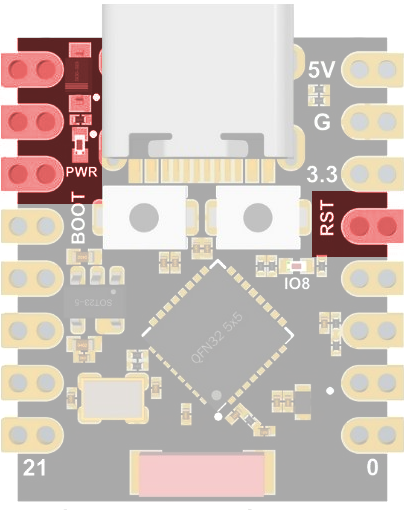
SPI-Pins
5 -> CIPO (MISO)
6 -> COPI (MOSI)
7-> CS
4 -> SCK/CLK
Beispiel: Anschluss eines runden TFTs

gelb -> 3 (RST)
weiß -> 7 (CS)
grün -> 2 (DC)
blau -> 6 (SDA)
braun -> 4 (SCL)
schwarz -> GND
rot -> 5V
schwarz -> GND
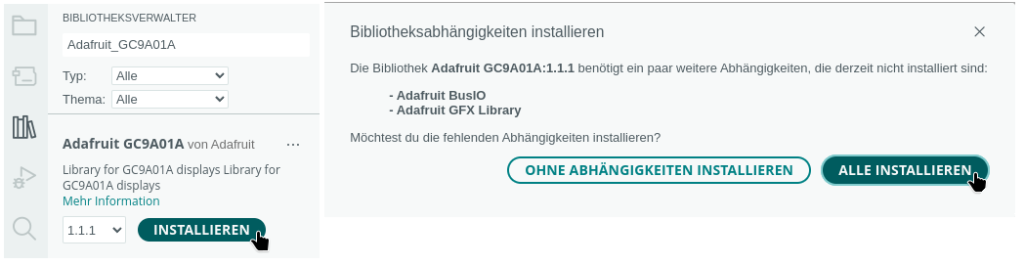
Benötigte Bibliothek
|
1 2 3 4 5 6 7 8 9 10 11 12 13 14 15 16 17 18 19 20 21 22 23 24 25 26 27 28 29 30 31 32 33 34 35 36 37 38 39 40 41 42 43 44 45 46 47 48 49 50 51 52 53 54 55 56 57 58 59 60 61 62 63 64 65 66 67 68 69 70 71 72 73 74 75 76 77 78 79 80 81 82 83 84 85 86 87 88 89 90 91 92 93 94 95 96 97 98 99 100 101 102 103 104 105 106 107 108 109 110 111 112 113 114 115 116 117 118 119 120 121 |
#include "Adafruit_GFX.h" #include "Adafruit_GC9A01A.h" #define TFT_RST 3 #define TFT_DC 2 #define TFT_CS 7 // Farben #define SCHWARZ 0x0000 #define WEISS 0xFFFF #define BLAU 0x001F #define ROT 0xF800 #define GRUEN 0x07E0 #define CYAN 0x07FF #define MAGENTA 0xF81F #define GELB 0xFFE0 #define BRAUN 0x9A60 #define GRAU 0x7BEF #define GRUENGELB 0xB7E0 #define DUNKELCYAN 0x03EF #define ORANGE 0xFDA0 #define PINK 0xFE19 #define BORDEAUX 0xA000 #define HELLBLAU 0x867D #define VIOLETT 0x915C #define SILBER 0xC618 #define GOLD 0xFEA0 Adafruit_GC9A01A tft(TFT_CS, TFT_DC); void setup() { // Zufallsgenerator starten randomSeed(analogRead(A0)); Serial.begin(9600); delay(500); Serial.println("Bildschirm: " + String(tft.height()) + " x " + String(tft.width())); // TFT starten tft.begin(); // Rotation anpassen tft.setRotation(2); // schwarzer Hintergrund tft.fillScreen(SCHWARZ); // interne Textdarstellung tft.setTextSize(3); tft.setCursor(30, 50); tft.setTextColor(BLAU); tft.print("Text"); delay(500); tft.setTextSize(4); tft.setCursor(30, 80); tft.setTextColor(GRUEN); tft.print("Text"); delay(2000); // zufällige Pixel tft.fillScreen(SCHWARZ); for (int i = 0; i < 700; i++) { int PixelX = random(1, tft.width()); int PixelY = random(1, tft.height()); tft.drawPixel(PixelX, PixelY, tft.color565(random(255),random(255),random(255))); delay(5); } delay(2000); // Kreise vom Mittelpunkt zeichnen tft.fillScreen(SCHWARZ); for (int i = 1; i < tft.width() / 2; i+=5) { tft.drawCircle(tft.width() / 2, tft.height() / 2, tft.width() / 2 - i, tft.color565(random(255),random(255),random(255))); delay(50); } delay(2000); for (int i = 1; i < tft.width() / 2; i+=5) { tft.drawCircle(tft.width() / 2, tft.height() / 2, tft.width() / 2 - i, SCHWARZ); delay(50); } delay(2000); // Kreise vom Mittelpunkt zeichnen tft.fillScreen(SCHWARZ); for (int i = 1; i < tft.width() / 2; i+=10) { tft.fillCircle(tft.width() / 2, tft.height() / 2, tft.width() / 2 - i, tft.color565(random(255),random(255),random(255))); delay(50); } delay(2000); /* alle 30° Linie vom Mittelpunkt zeichnen 120 = Radius des TFTs (240/2) 90 = PI/4 (Viertelkreis) DEG_TO_RAD (0.0174532925) -> Winkel in Bogenmaß umrechnen es ensteht ein Dreieck mit einem Rechten Winkel -> Winkelfunktionen sin/cos anwenden */ tft.fillScreen(SCHWARZ); for (int i = 0; i < 360; i += 30) { float PosX = cos((i - 90) * DEG_TO_RAD) * 120; float PosY = sin((i - 90) * DEG_TO_RAD) * 120; int PunktX = PosX + 120; int PunktY = PosY + 120; tft.drawLine(120, 120, PosX + 120, PosY + 120, WEISS); } delay(2000); } void loop() { // nichts zu tun, das Programm // läuft nur einmal } |
Analoge Pins
Die Auflösung des ADC-Wandlers kann zwischen 9-Bit (0 – 511), 10 Bit (0 – 1023), 11 Bit (0 – 2047) und 12 Bit (0 – 4095) Die Standardeinstellung ist 12 Bit. Die Anweisung analogReadResolution() beeinflusst den ADC-Wandler.
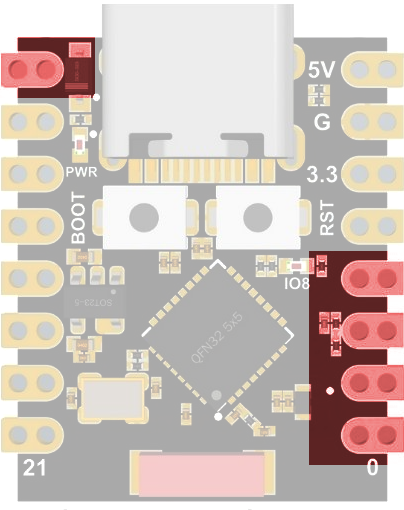
Analoge Pins
4 (SPI)
3
2
1
0
Beispiel:
|
1 2 3 4 5 6 7 8 9 10 11 |
void setup() { Serial.begin(9600); analogReadResolution(10); } void loop() { Serial.println("ADC-Wert: " + String(analogRead(0))); delay(200); } |
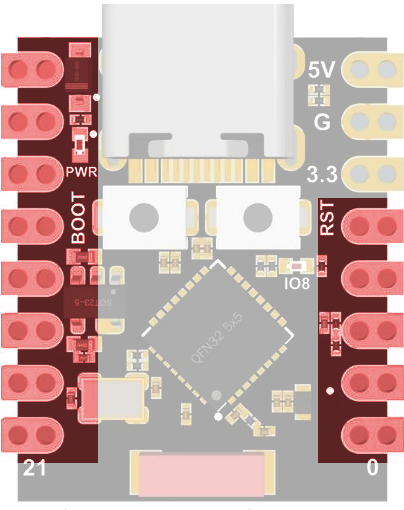
Digitale Pins
Alle Pins können digitale Signale verarbeiten:
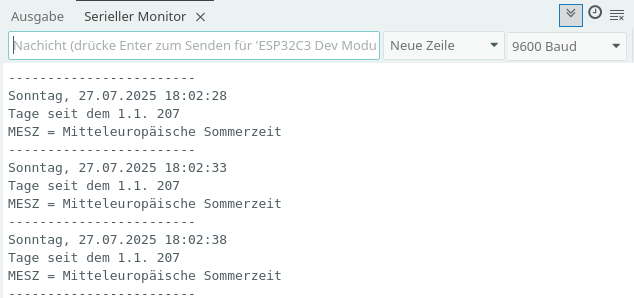
Zeit mit der Bibliothek time.h anzeigen
ESP32-Mikrocontroller können mit der Standardbibliothek time.h Datum und Zeit anzeigen.
Beispiel: ⇒Anzeige von Datum und Zeit auf einem OLED-Display
|
1 2 3 4 5 6 7 8 9 10 11 12 13 14 15 16 17 18 19 20 21 22 23 24 25 26 27 28 29 30 31 32 33 34 35 36 37 38 39 40 41 42 43 44 45 46 47 48 49 50 51 52 53 54 55 56 57 58 59 60 61 62 63 64 65 66 67 68 69 70 71 72 73 74 75 76 77 78 79 80 81 82 83 84 85 86 87 88 89 90 91 92 93 94 95 96 97 98 99 100 101 102 103 104 105 106 107 108 109 110 111 112 113 114 115 116 117 118 119 120 121 122 123 124 125 126 127 128 129 130 131 132 133 134 135 136 137 138 139 |
#include "WiFi.h" #include "time.h" char Router[] = "Router_SSID"; char Passwort[] = "xxxxxxxx"; // NTP-Server aus dem Pool #define Zeitserver "de.pool.ntp.org" /* Liste der Zeitzonen https://github.com/nayarsystems/posix_tz_db/blob/master/zones.csv Zeitzone CET = Central European Time -1 -> 1 Stunde zurück CEST = Central European Summer Time von M3 = März, 5.0 = Sonntag 5. Woche, 02 = 2 Uhr bis M10 = Oktober, 5.0 = Sonntag 5. Woche 03 = 3 Uhr */ #define Zeitzone "CET-1CEST,M3.5.0/02,M10.5.0/03" // time_t enthält die Anzahl der Sekunden seit dem 1.1.1970 0 Uhr time_t aktuelleZeit; /* Struktur tm tm_hour -> Stunde: 0 bis 23 tm_min -> Minuten: 0 bis 59 tm_sec -> Sekunden 0 bis 59 tm_mday -> Tag 1 bis 31 tm_mon -> Monat: 0 (Januar) bis 11 (Dezember) tm_year -> Jahre seit 1900 tm_yday -> vergangene Tage seit 1. Januar des Jahres tm_isdst -> Wert > 0 = Sommerzeit (dst = daylight saving time) */ tm Zeit; void setup() { Serial.begin(9600); // WiFi starten // Stations-Modus WiFi.mode(WIFI_STA); WiFi.begin(Router, Passwort); while (WiFi.status() != WL_CONNECTED) { delay(200); Serial.print("."); } Serial.println(); Serial.print("Verbunden mit "); Serial.println(Router); Serial.print("IP über DHCP: "); Serial.println(WiFi.localIP()); // Zeitzone: Parameter für die zu ermittelnde Zeit configTzTime(Zeitzone, Zeitserver); } void loop() { // aktuelle Zeit holen time(&aktuelleZeit); // localtime_r -> Zeit in die lokale Zeitzone setzen localtime_r(&aktuelleZeit, &Zeit); switch (Zeit.tm_wday) { case 0: Serial.print("Sonntag"); break; case 1: Serial.print("Montag"); break; case 2: Serial.print("Dienstag"); break; case 3: Serial.print("Mittwoch"); break; case 4: Serial.print("Donnerstag"); break; case 5: Serial.print("Freitag"); break; case 6: Serial.print("Samstag"); break; } Serial.print(", "); // Tag: führende 0 ergänzen if (Zeit.tm_mday < 10) { Serial.print("0"); } Serial.print(Zeit.tm_mday); Serial.print("."); // Monat: führende 0 ergänzen if (Zeit.tm_mon < 9) { Serial.print("0"); } Serial.print(Zeit.tm_mon + 1); Serial.print("."); // Anzahl Jahre seit 1900 Serial.print(Zeit.tm_year + 1900); Serial.print(" "); // Stunde: wenn Stunde < 10 -> 0 davor setzen if (Zeit.tm_hour < 10) { Serial.print("0"); } Serial.print(Zeit.tm_hour); Serial.print(":"); // Minuten if (Zeit.tm_min < 10) { Serial.print("0"); } Serial.print(Zeit.tm_min); Serial.print(":"); // Sekunden if (Zeit.tm_sec < 10) { Serial.print("0"); } Serial.print(Zeit.tm_sec); Serial.println(); delay(1000); } |
Webserver
Beispiel
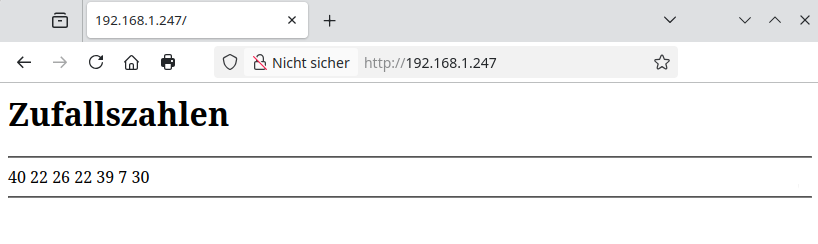
Das Programm zeigt im Browser 6 Zufallszahlen an.
Im Seriellen Monitor wird die mit DHCP ermittelte IP des ESP32-C3 angezeigt.
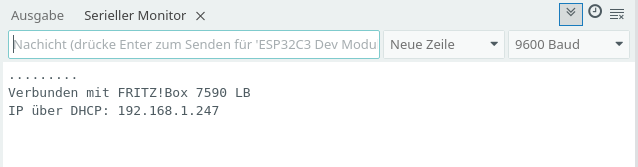
Diese Adresse musst du in einem Browser deiner Wahl eingeben.
|
1 2 3 4 5 6 7 8 9 10 11 12 13 14 15 16 17 18 19 20 21 22 23 24 25 26 27 28 29 30 31 32 33 34 35 36 37 38 39 40 41 42 43 44 45 46 47 48 49 50 51 52 53 54 55 56 57 58 59 60 61 62 63 64 65 66 67 68 69 70 71 72 73 74 75 76 77 78 79 80 81 82 83 84 85 86 87 88 89 90 91 92 93 94 |
#include "WiFi.h" #include "WebServer.h" // SSID und Passwort des Routers char Router[] = "Router_SSID"; char Passwort[] = "xxxxxxxx"; WebServer Server(80); // Minimum und Maximum der Zufallszahlen int Minimum = 1; int Maximum = 49; // statischeIP = false -> IP-Adresse über DHCP vergeben // statischeIP = true -> statische IP festlegen bool statischeIP = false; // ip und gateway müssen an das lokale Netz angepasst werden IPAddress ip(192, 168, 1, 100); IPAddress gateway(192, 168, 1, 1); IPAddress subnet(255, 255, 255, 0); void setup() { Serial.begin(9600); // auf serielle Verbindung warten while (!Serial); delay(1000); // WiFi starten WiFi.begin(Router, Passwort); // statische IP vergeben if (statischeIP) { WiFi.config(ip, gateway, subnet); Serial.print("Verbunden mit "); Serial.println(Router); // IP anzeigen Serial.print("Statische IP: "); } // IP über DHCP ermitteln else { while (WiFi.status() != WL_CONNECTED) { delay(200); Serial.print("."); } Serial.println(); Serial.print("Verbunden mit "); Serial.println(Router); Serial.print("IP über DHCP: "); } // IP anzeigen Serial.println(WiFi.localIP()); // Zufallsgenerator mit dem Signal an A0 starten randomSeed(analogRead(A0)); Server.begin(); Server.on("/", SeiteBauen); } void loop() { Server.handleClient(); } void SeiteBauen() { // Seite zusammenbauen // Kopf der HTML-Seite: aktualisierung alle 60 Sekunden // kann angepasst werden String Nachricht = "<head><meta http-equiv=\"refresh\" content=\"60\"></head>"; Nachricht += "<h1>Zufallszahlen</h1>"; Nachricht += "<hr>"; // Zufallszahlen anzeigen for (int i = 0; i < 7; i++) { int Zahl = random(Minimum, Maximum); Nachricht += String(Zahl) + " "; } Nachricht += "<hr>"; // Nachricht senden -> Seite anzeigen Server.send(200, "text/html", Nachricht); } |
Quellen
Letzte Aktualisierung: