
Bibliothek TFT_eSPI
|
1 2 3 4 5 6 7 8 9 10 11 12 13 14 15 16 17 18 19 20 21 22 23 24 25 26 27 28 29 30 31 32 33 34 35 36 37 38 39 40 41 42 43 44 45 46 47 48 49 50 51 52 53 54 55 56 57 58 59 60 61 62 63 64 65 66 67 68 69 70 71 72 73 74 75 76 77 78 79 80 81 82 83 84 85 86 87 88 89 90 91 92 93 94 95 96 97 98 99 100 101 102 103 104 105 106 107 108 109 110 111 112 113 114 115 116 117 118 119 120 121 122 123 124 125 126 127 128 129 130 131 132 133 134 135 136 137 138 139 140 141 142 143 144 145 146 147 148 149 150 151 152 153 154 155 156 157 158 159 160 161 162 163 164 165 166 167 168 169 170 171 172 173 174 175 176 177 178 179 180 181 182 183 184 185 186 187 188 189 190 191 192 193 194 195 196 197 198 199 200 201 202 203 204 205 206 207 208 209 210 211 212 213 214 215 216 217 218 219 220 221 222 223 224 225 226 227 228 229 230 231 232 233 234 235 236 237 238 239 240 241 242 243 244 245 246 247 248 249 250 251 252 253 254 255 256 257 258 259 260 261 262 263 264 265 266 267 268 269 270 271 272 273 274 275 276 277 278 279 280 281 282 283 284 285 286 287 288 289 290 291 292 293 294 295 296 297 298 299 300 301 302 303 304 305 306 307 308 309 310 311 312 313 314 315 316 317 318 319 320 321 322 323 324 325 326 327 328 329 330 331 332 333 334 335 336 337 338 339 340 341 342 343 344 345 346 347 348 349 350 351 352 353 354 355 356 357 358 359 360 361 362 363 364 365 366 367 368 369 370 371 372 373 374 375 376 377 378 379 380 381 382 383 384 385 386 387 388 389 390 391 392 393 394 395 396 397 398 399 400 |
#include "esp_random.h" #include "WiFi.h" #include "TFT_eSPI.h" #include "XPT2046_Touchscreen_TT.h" TFT_eSPI tft = TFT_eSPI(); #define SCHWARZ 0x0000 #define WEISS 0xFFFF #define BLAU 0x001F #define ROT 0xF800 #define GRUEN 0x07E0 #define CYAN 0x07FF #define MAGENTA 0xF81F #define GELB 0xFFE0 #define BRAUN 0x9A60 #define GRAU 0x7BEF #define GRUENGELB 0xB7E0 #define DUNKELCYAN 0x03EF #define ORANGE 0xFDA0 #define BORDEAUX 0xA000 #define HELLBLAU 0x867D #define VIOLETT 0x915C #define SILBER 0xC618 #define GOLD 0xFEA0 #define PINK 0xFE19 // Farben Würfel #define RahmenEins ROT #define FarbeEins ROT #define RahmenEins ROT #define FarbeEins ROT #define FarbeZwei MAGENTA #define RahmenZwei MAGENTA #define FarbeDrei BLAU #define RahmenDrei BLAU #define FarbeVier GELB #define RahmenVier GELB #define FarbeFuenf DUNKELCYAN #define RahmenFuenf DUNKELCYAN #define FarbeSechs GRUEN #define RahmenSechs GRUEN // IRQ-Pin Touch #define TOUCH_IRQ 36 // SPI-Pins als Hardware-SPI SPIClass touchscreenSPI = SPIClass(VSPI); XPT2046_Touchscreen touchscreen(TOUCH_CS, TOUCH_IRQ); // Touchscreen Koordinaten (z = Druck) int x, y, z; int Minimum = 1; int Maximum = 7; // Zufallszahl uint32_t Zahl; int AnzahlSimulation = 5; int PauseSimulation = 200; bool Simulation = true; bool SymbolAnzeigen = true; // Standardfarbe schwarz bool FarbeSchwarz = true; bool FarbeWeiss = false; bool FarbeBlau = false; void setup() { Serial.begin(9600); delay(1000); // notwendig für Zufallszahlen WiFi.mode(WIFI_STA); WiFi.begin(); WiFi.disconnect(true); // Bluetooth ausschalten btStop(); // Anzahl der Simulatioen muss mindestens 1 sein if (AnzahlSimulation == 0) AnzahlSimulation = 1; // SPI-Bus für den Touchscreen starten touchscreenSPI.begin(TOUCH_CLK, TOUCH_MISO, TOUCH_MOSI, TOUCH_CS); touchscreen.begin(touchscreenSPI); /* wenn die Bildschirm-Koordinaten und die Touchscreen-Kordinaten nicht übereinstimmen (Touchscreen ist "falsch" herum) Rotation des Touchscreen setzen: touchscreen.setRotation(3); */ // tft starten, Farben invertieren tft.init(); tft.invertDisplay(0); // Bildschirm drehen tft.setRotation(1); touchscreen.setRotation(1); // Hintergrundbeleuchtung einschalten pinMode(TFT_BL, OUTPUT); digitalWrite(TFT_BL, HIGH); /* wenn die Bildschirm-Koordinaten und die Touchscreen-Kordinaten nicht übereinstimmen (Touchscreen ist "falsch" herum) Rotation des Touchscreen setzen: touchscreen.setRotation(3); */ // interne Schrift tft.fillScreen(SCHWARZ); tft.setTextColor(WEISS); tft.setTextFont(4); tft.setCursor(125, 110); tft.print("Touch"); for (int i = 60; i < 90; i += 10) { tft.drawCircle(tft.width() / 2, tft.height() / 2, i, tft.color565(random(255), random(255), random(255))); delay(50); } } void loop() { if(SymbolAnzeigen) { if(Simulation) { tft.fillRect(10, 10, 40, 40, BLAU); if(FarbeSchwarz) tft.drawRoundRect(10, 10, 40, 40, 5, SCHWARZ); else tft.drawRoundRect(10, 10, 40, 40, 5, WEISS); tft.setCursor(20, 20); tft.print("S"); } else { tft.fillRect(10, 10, 40, 40, BORDEAUX); tft.drawRoundRect(10, 10, 40, 40, 5, WEISS); tft.setCursor(20, 20); tft.print("S"); tft.drawLine(10, 10, 45, 45, WEISS); } tft.fillRect(10, 60, 40, 40, WEISS); tft.fillRect(10, 110, 40, 40, SCHWARZ); tft.fillRect(10, 160, 40, 40, HELLBLAU); tft.drawRoundRect(10, 60, 40, 40, 5, SCHWARZ); tft.drawRoundRect(10, 110, 40, 40, 5, WEISS); tft.drawRoundRect(10, 160, 40, 40, 5, WEISS); SymbolAnzeigen = false; } // wenn der Touchscreen berührt wurde if (touchscreen.tirqTouched() && touchscreen.touched()) { // Punkte x, y und Druck (z) ermitteln TS_Point Punkt = touchscreen.getPoint(); /* die "Rohwerte" der Punkte x und y bewegen sich zwischen 1 und 3800 bzw. 4000 daher müssen sie mit map auf die korrekten Bildschirmmaße korrigiert werden */ x = map(Punkt.x, 240, 4000, 1, tft.width()); y = map(Punkt.y, 320, 3800, 1, tft.height()); // Symbol Simulation if (x >= 5 && x <= 50 && y >= 10 && y <= 50) { Simulation = !Simulation; if(Simulation) { tft.fillRect(10, 10, 40, 40, BLAU); if(FarbeSchwarz) tft.drawRoundRect(10, 10, 40, 40, 5, SCHWARZ); else tft.drawRoundRect(10, 10, 40, 40, 5, WEISS); tft.setCursor(20, 20); tft.print("S"); } else { tft.fillRect(10, 10, 40, 40, BORDEAUX); tft.drawRoundRect(10, 10, 40, 40, 5, WEISS); tft.setCursor(20, 20); tft.print("S"); tft.drawLine(10, 10, 45, 45, WEISS); } } if (x >= 5 && x <= 50 && y >= 60 && y <= 100) { tft.fillScreen(WEISS); SymbolAnzeigen = true; FarbeWeiss = true; FarbeSchwarz = false; FarbeBlau = false; WuerfelAnzeigen(Zahl); } // Symbol weiss if (x >= 5 && x <= 50 && y >= 60 && y <= 100) { tft.fillScreen(WEISS); SymbolAnzeigen = true; FarbeWeiss = true; FarbeSchwarz = false; FarbeBlau = false; WuerfelAnzeigen(Zahl); } // Symbol schwarz if (x >= 5 && x <= 50 && y >= 110 && y <= 150) { tft.fillScreen(SCHWARZ); SymbolAnzeigen = true; FarbeWeiss = false; FarbeSchwarz = true; FarbeBlau = false; WuerfelAnzeigen(Zahl); } // Symbol blau if (x >= 5 && x <= 50 && y >= 160 && y <= 210) { tft.fillScreen(HELLBLAU); SymbolAnzeigen = true; FarbeWeiss = false; FarbeSchwarz = false; FarbeBlau = true; WuerfelAnzeigen(Zahl); } // Würfel Koordinaten if (x >= 60 && x <= 320 && y >= 20 && y <= 220) { // Würfeln simmulieren if (Simulation) { for (int i = 0; i < AnzahlSimulation; i++) { Zahl = Wuerfeln(); WuerfelAnzeigen(Zahl); delay(PauseSimulation); } } else Zahl = Wuerfeln(); switch (Zahl) { case 1: WuerfelEins(); break; case 2: WuerfelZwei(); break; case 3: WuerfelDrei(); break; case 4: WuerfelVier(); break; case 5: WuerfelFuenf(); break; case 6: WuerfelSechs(); break; } } } delay(100); } int Wuerfeln() { // solange würfeln bis die Zahl > 0 do { Zahl = esp_random() % 7; } while (Zahl == 0); return Zahl; } void WuerfelEins() { if(FarbeSchwarz) tft.fillRect(65, 25, 190, 190, SCHWARZ); if(FarbeWeiss) tft.fillRect(65, 25, 190, 190, WEISS); if(FarbeBlau) tft.fillRect(65, 25, 190, 190, HELLBLAU); tft.drawRoundRect(60, 20, 200, 200, 10, RahmenEins); tft.drawRoundRect(59, 19, 200, 200, 10, RahmenEins); tft.fillCircle(tft.width() / 2 - 5, tft.height() / 2, 15, FarbeEins); } void WuerfelZwei() { if(FarbeSchwarz) tft.fillRect(65, 25, 190, 190, SCHWARZ); if(FarbeWeiss) tft.fillRect(65, 25, 190, 190, WEISS); if(FarbeBlau) tft.fillRect(65, 25, 190, 190, HELLBLAU); tft.drawRoundRect(60, 20, 200, 200, 10, RahmenZwei); tft.drawRoundRect(59, 19, 200, 200, 10, RahmenZwei); tft.fillCircle(90, 50, 15, FarbeZwei); tft.fillCircle(225, 190, 15, FarbeZwei); } void WuerfelDrei() { if(FarbeSchwarz) tft.fillRect(65, 25, 190, 190, SCHWARZ); if(FarbeWeiss) tft.fillRect(65, 25, 190, 190, WEISS); if(FarbeBlau) tft.fillRect(65, 25, 190, 190, HELLBLAU); tft.drawRoundRect(60, 20, 200, 200, 10, RahmenDrei); tft.drawRoundRect(59, 19, 200, 200, 10, RahmenDrei); tft.fillCircle(tft.width() / 2 - 5, tft.height() / 2, 15, FarbeDrei); tft.fillCircle(90, 50, 15, FarbeDrei); tft.fillCircle(225, 190, 15, FarbeDrei); } void WuerfelVier() { if(FarbeSchwarz) tft.fillRect(65, 25, 190, 190, SCHWARZ); if(FarbeWeiss) tft.fillRect(65, 25, 190, 190, WEISS); if(FarbeBlau) tft.fillRect(65, 25, 190, 190, HELLBLAU); tft.drawRoundRect(60, 20, 200, 200, 10, RahmenVier); tft.drawRoundRect(59, 19, 200, 200, 10, RahmenVier); tft.fillCircle(90, 50, 15, FarbeVier); tft.fillCircle(225, 190, 15, FarbeVier); tft.fillCircle(225, 50, 15, FarbeVier); tft.fillCircle(90, 190, 15, FarbeVier); } void WuerfelFuenf() { if(FarbeSchwarz) tft.fillRect(65, 25, 190, 190, SCHWARZ); if(FarbeWeiss) tft.fillRect(65, 25, 190, 190, WEISS); if(FarbeBlau) tft.fillRect(65, 25, 190, 190, HELLBLAU); tft.drawRoundRect(60, 20, 200, 200, 10, RahmenFuenf); tft.drawRoundRect(59, 19, 200, 200, 10, RahmenFuenf); tft.fillCircle(tft.width() / 2 - 5, tft.height() / 2, 15, FarbeFuenf); tft.fillCircle(90, 50, 15, FarbeFuenf); tft.fillCircle(225, 190, 15, FarbeFuenf); tft.fillCircle(225, 50, 15, FarbeFuenf); tft.fillCircle(90, 190, 15, FarbeFuenf); } void WuerfelSechs() { if(FarbeSchwarz) tft.fillRect(65, 25, 190, 190, SCHWARZ); if(FarbeWeiss) tft.fillRect(65, 25, 190, 190, WEISS); if(FarbeBlau) tft.fillRect(65, 25, 190, 190, HELLBLAU); tft.drawRoundRect(60, 20, 200, 200, 10, RahmenSechs); tft.drawRoundRect(59, 19, 200, 200, 10, RahmenSechs); tft.fillCircle(90, 50, 15, FarbeSechs); tft.fillCircle(225, 190, 15, FarbeSechs); tft.fillCircle(225, 50, 15, FarbeSechs); tft.fillCircle(90, 190, 15, FarbeSechs); tft.fillCircle(tft.width() / 2 - 5, 190, 15, FarbeSechs); tft.fillCircle(tft.width() / 2 - 5, 50, 15, FarbeSechs); } void WuerfelAnzeigen(int Zahl) { switch (Zahl) { case 1: WuerfelEins(); break; case 2: WuerfelZwei(); break; case 3: WuerfelDrei(); break; case 4: WuerfelVier(); break; case 5: WuerfelFuenf(); break; case 6: WuerfelSechs(); break; } } |
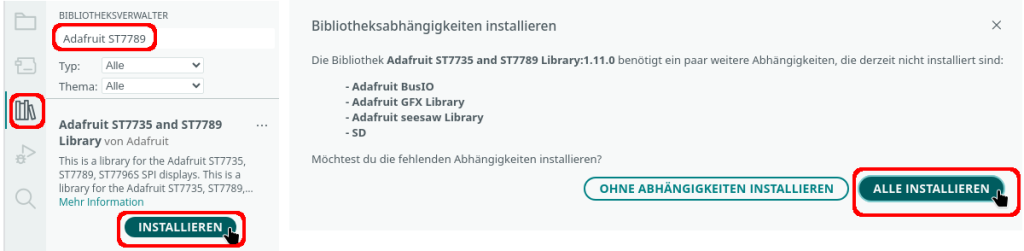
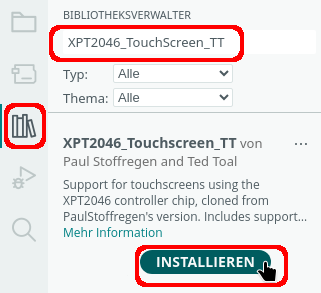
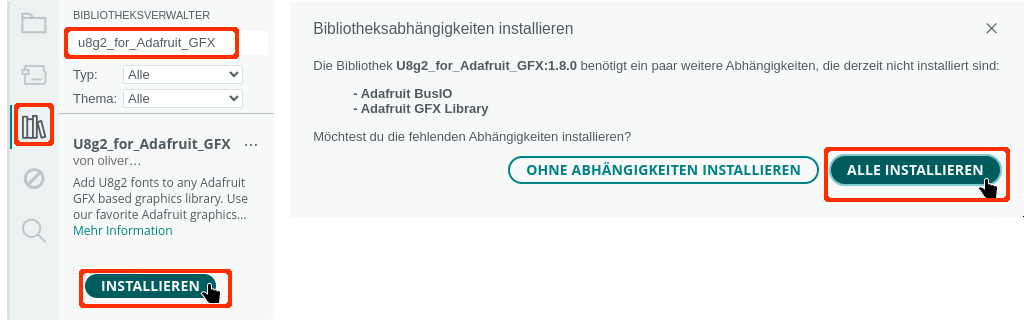
Bibliothek Adafruit_ST7789
Der Aufbau des Bildschirms ist gegenüber der Bibliothek TFT_eSPI deutlich langsamer.
Das Programm ist auf die Würfelfunktion beschränkt.
|
1 2 3 4 5 6 7 8 9 10 11 12 13 14 15 16 17 18 19 20 21 22 23 24 25 26 27 28 29 30 31 32 33 34 35 36 37 38 39 40 41 42 43 44 45 46 47 48 49 50 51 52 53 54 55 56 57 58 59 60 61 62 63 64 65 66 67 68 69 70 71 72 73 74 75 76 77 78 79 80 81 82 83 84 85 86 87 88 89 90 91 92 93 94 95 96 97 98 99 100 101 102 103 104 105 106 107 108 109 110 111 112 113 114 115 116 117 118 119 120 121 122 123 124 125 126 127 128 129 130 131 132 133 134 135 136 137 138 139 140 141 142 143 144 145 146 147 148 149 150 151 152 153 154 155 156 157 158 159 160 161 162 163 164 165 166 167 168 169 170 171 172 173 174 175 176 177 178 179 180 181 182 183 184 185 186 187 188 189 190 191 192 193 194 195 196 197 198 199 200 201 202 203 204 205 206 207 208 209 210 211 212 213 214 215 216 217 218 219 220 221 222 223 224 225 226 227 228 229 230 231 232 233 234 235 236 237 238 239 240 241 242 243 244 245 246 247 248 249 250 251 252 253 254 255 256 257 258 259 260 261 262 263 264 |
#include "Adafruit_ST7789.h" #include "XPT2046_Touchscreen_TT.h" #include "U8g2_for_Adafruit_GFX.h" #include "esp_random.h" #include "WiFi.h" // Objekt für Schriften von U8g2 (u8g2Schriften) U8G2_FOR_ADAFRUIT_GFX u8g2Schriften; #define SCHWARZ 0x0000 #define WEISS 0xFFFF #define BLAU 0x001F #define ROT 0xF800 #define GRUEN 0x07E0 #define CYAN 0x07FF #define MAGENTA 0xF81F #define GELB 0xFFE0 #define BRAUN 0x9A60 #define GRAU 0x7BEF #define GRUENGELB 0xB7E0 #define DUNKELCYAN 0x03EF #define ORANGE 0xFDA0 #define BORDEAUX 0xA000 #define HELLBLAU 0x867D #define VIOLETT 0x915C #define SILBER 0xC618 #define GOLD 0xFEA0 // Farben Würfel #define RahmenEins ROT #define FarbeEins ROT #define RahmenEins ROT #define FarbeEins ROT #define FarbeZwei MAGENTA #define RahmenZwei MAGENTA #define FarbeDrei BLAU #define RahmenDrei BLAU #define FarbeVier GELB #define RahmenVier GELB #define FarbeFuenf SILBER #define RahmenFuenf SILBER #define FarbeSechs GRUEN #define RahmenSechs GRUEN // TFT-Pins (Software-SPI) #define TFT_BL 21 #define TFT_CS 15 #define TFT_DC 2 #define TFT_MISO 12 #define TFT_MOSI 13 #define TFT_SCLK 14 #define TFT_RST -1 Adafruit_ST7789 tft = Adafruit_ST7789(TFT_CS, TFT_DC, TFT_MOSI, TFT_SCLK, TFT_RST); // Touchscreen SPI-Pins #define TOUCH_MOSI 32 #define TOUCH_MISO 39 #define TOUCH_CLK 25 #define TOUCH_CS 33 // IRQ-Pin #define TOUCH_IRQ 36 // SPI-Pins als Hardware-SPI SPIClass touchscreenSPI = SPIClass(VSPI); XPT2046_Touchscreen touchscreen(TOUCH_CS, TOUCH_IRQ); // Touchscreen Koordinaten (z = Druck) int x, y, z; int Minimum = 1; int Maximum = 7; // Zufallszahl uint32_t Zahl; void setup() { Serial.begin(9600); delay(1000); // notwendig für Zufallszahlen WiFi.mode(WIFI_STA); WiFi.begin(); WiFi.disconnect(true); // Bluetooth ausschalten btStop(); // Schriften von u8g2 tft zuordnen u8g2Schriften.begin(tft); // SPI-Bus für den Touchscreen starten touchscreenSPI.begin(TOUCH_CLK, TOUCH_MISO, TOUCH_MOSI, TOUCH_CS); touchscreen.begin(touchscreenSPI); /* wenn die Bildschirm-Koordinaten und die Touchscreen-Kordinaten nicht übereinstimmen (Touchscreen ist "falsch" herum) Rotation des Touchscreen setzen: touchscreen.setRotation(3); */ // tft starten, Farben invertieren tft.init(240, 320); tft.invertDisplay(0); // Bildschirm drehen tft.setRotation(1); touchscreen.setRotation(3); // Hintergrundbeleuchtung einschalten pinMode(TFT_BL, OUTPUT); digitalWrite(TFT_BL, HIGH); /* wenn die Bildschirm-Koordinaten und die Touchscreen-Kordinaten nicht übereinstimmen (Touchscreen ist "falsch" herum) Rotation des Touchscreen setzen: touchscreen.setRotation(3); */ tft.fillScreen(SCHWARZ); u8g2Schriften.setForegroundColor(WEISS); u8g2Schriften.setBackgroundColor(SCHWARZ); u8g2Schriften.setCursor(115, 130); u8g2Schriften.setFont(u8g2_font_helvR24_tf); u8g2Schriften.print("Touch"); for (int i = 60; i < 90; i+=10) { tft.drawCircle(tft.width() / 2, tft.height() / 2, i, tft.color565(random(255),random(255),random(255))); delay(50); } } void loop() { // wenn der Touchscreen berührt wurde if (touchscreen.tirqTouched() && touchscreen.touched()) { // Punkte x, y und Druck (z) ermitteln TS_Point Punkt = touchscreen.getPoint(); /* die "Rohwerte" der Punkte x und y bewegen sich zwischen 1 und 3800 bzw. 4000 daher müssen sie mit map auf die korrekten Bildschirmmaße korrigiert werden */ x = map(Punkt.x, 240, 4000, 1, tft.width()); y = map(Punkt.y, 320, 3800, 1, tft.height()); z = Punkt.z; // linker Button Koordinaten abfragen if (x >= 10 && x <= 300 && y >= 10 && y <= 220) { Zahl = Wuerfeln(); switch (Zahl) { case 1: WuerfelEins(); break; case 2: WuerfelZwei(); break; case 3: WuerfelDrei(); break; case 4: WuerfelVier(); break; case 5: WuerfelFuenf(); break; case 6: WuerfelSechs(); break; } } delay(100); } } int Wuerfeln() { // solange würfeln bis die Zahl > 0 do { Zahl = esp_random() % 7; } while (Zahl == 0); return Zahl; } void WuerfelEins() { tft.fillRect(65, 25, 190, 190, SCHWARZ); tft.drawRoundRect(60, 20, 200, 200, 10, RahmenEins); tft.drawRoundRect(59, 19, 200, 200, 10, RahmenEins); tft.fillCircle(tft.width() / 2 - 5, tft.height() / 2, 15, FarbeEins); } void WuerfelZwei() { tft.fillRect(65, 25, 190, 190, SCHWARZ); tft.drawRoundRect(60, 20, 200, 200, 10, RahmenZwei); tft.drawRoundRect(59, 19, 200, 200, 10, RahmenZwei); tft.fillCircle(90, 50, 15, FarbeZwei); tft.fillCircle(225, 190, 15, FarbeZwei); } void WuerfelDrei() { tft.fillRect(65, 25, 190, 190, SCHWARZ); tft.drawRoundRect(60, 20, 200, 200, 10, RahmenDrei); tft.drawRoundRect(59, 19, 200, 200, 10, RahmenDrei); tft.fillCircle(tft.width() / 2 - 5, tft.height() / 2, 15, FarbeDrei); tft.fillCircle(90, 50, 15, FarbeDrei); tft.fillCircle(225, 190, 15, FarbeDrei); } void WuerfelVier() { tft.fillRect(65, 25, 190, 190, SCHWARZ); tft.drawRoundRect(60, 20, 200, 200, 10, RahmenVier); tft.drawRoundRect(59, 19, 200, 200, 10, RahmenVier); tft.fillCircle(90, 50, 15, FarbeVier); tft.fillCircle(225, 190, 15, FarbeVier); tft.fillCircle(225, 50, 15, FarbeVier); tft.fillCircle(90, 190, 15, FarbeVier); } void WuerfelFuenf() { tft.fillRect(65, 25, 190, 190, SCHWARZ); tft.drawRoundRect(60, 20, 200, 200, 10, RahmenFuenf); tft.drawRoundRect(59, 19, 200, 200, 10, RahmenFuenf); tft.fillCircle(tft.width() / 2 - 5, tft.height() / 2, 15, FarbeFuenf); tft.fillCircle(90, 50, 15, FarbeFuenf); tft.fillCircle(225, 190, 15, FarbeFuenf); tft.fillCircle(225, 50, 15, FarbeFuenf); tft.fillCircle(90, 190, 15, FarbeFuenf); } void WuerfelSechs() { tft.fillRect(65, 25, 190, 190, SCHWARZ); tft.drawRoundRect(60, 20, 200, 200, 10, RahmenSechs); tft.drawRoundRect(59, 19, 200, 200, 10, RahmenSechs); tft.fillCircle(90, 50, 15, FarbeSechs); tft.fillCircle(225, 190, 15, FarbeSechs); tft.fillCircle(225, 50, 15, FarbeSechs); tft.fillCircle(90, 190, 15, FarbeSechs); tft.fillCircle(tft.width() / 2 - 5, 190, 15, FarbeSechs); tft.fillCircle(tft.width() / 2 - 5, 50, 15, FarbeSechs); } |
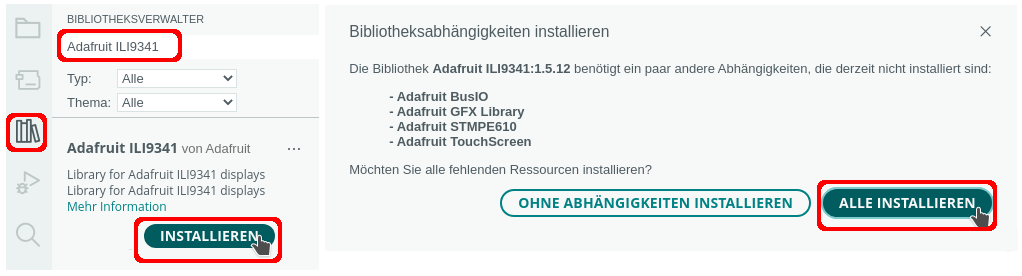
Bibliothek Adafruit_ILI9341
Der Aufbau des Bildschirms ist gegenüber der Bibliothek TFT_eSPI deutlich langsamer.
Das Programm ist auf die Würfelfunktion beschränkt.
|
1 2 3 4 5 6 7 8 9 10 11 12 13 14 15 16 17 18 19 20 21 22 23 24 25 26 27 28 29 30 31 32 33 34 35 36 37 38 39 40 41 42 43 44 45 46 47 48 49 50 51 52 53 54 55 56 57 58 59 60 61 62 63 64 65 66 67 68 69 70 71 72 73 74 75 76 77 78 79 80 81 82 83 84 85 86 87 88 89 90 91 92 93 94 95 96 97 98 99 100 101 102 103 104 105 106 107 108 109 110 111 112 113 114 115 116 117 118 119 120 121 122 123 124 125 126 127 128 129 130 131 132 133 134 135 136 137 138 139 140 141 142 143 144 145 146 147 148 149 150 151 152 153 154 155 156 157 158 159 160 161 162 163 164 165 166 167 168 169 170 171 172 173 174 175 176 177 178 179 180 181 182 183 184 185 186 187 188 189 190 191 192 193 194 195 196 197 198 199 200 201 202 203 204 205 206 207 208 209 210 211 212 213 214 215 216 217 218 219 220 221 222 223 224 225 226 227 228 229 230 231 232 233 234 235 236 237 238 239 240 241 242 243 244 245 246 247 248 249 250 251 252 253 254 255 256 257 258 259 260 261 262 263 264 |
#include "Adafruit_ILI9341.h" #include "XPT2046_Touchscreen_TT.h" #include "U8g2_for_Adafruit_GFX.h" #include "esp_random.h" #include "WiFi.h" // Objekt für Schriften von U8g2 (u8g2Schriften) U8G2_FOR_ADAFRUIT_GFX u8g2Schriften; #define SCHWARZ 0x0000 #define WEISS 0xFFFF #define BLAU 0x001F #define ROT 0xF800 #define GRUEN 0x07E0 #define CYAN 0x07FF #define MAGENTA 0xF81F #define GELB 0xFFE0 #define BRAUN 0x9A60 #define GRAU 0x7BEF #define GRUENGELB 0xB7E0 #define DUNKELCYAN 0x03EF #define ORANGE 0xFDA0 #define BORDEAUX 0xA000 #define HELLBLAU 0x867D #define VIOLETT 0x915C #define SILBER 0xC618 #define GOLD 0xFEA0 // Farben Würfel #define RahmenEins ROT #define FarbeEins ROT #define RahmenEins ROT #define FarbeEins ROT #define FarbeZwei MAGENTA #define RahmenZwei MAGENTA #define FarbeDrei BLAU #define RahmenDrei BLAU #define FarbeVier GELB #define RahmenVier GELB #define FarbeFuenf SILBER #define RahmenFuenf SILBER #define FarbeSechs GRUEN #define RahmenSechs GRUEN // TFT-Pins (Software-SPI) #define TFT_BL 21 #define TFT_CS 15 #define TFT_DC 2 #define TFT_MISO 12 #define TFT_MOSI 13 #define TFT_SCLK 14 #define TFT_RST -1 Adafruit_ILI9341 tft = Adafruit_ILI9341(TFT_CS, TFT_DC, TFT_MOSI, TFT_SCLK, TFT_RST); // Touchscreen SPI-Pins #define TOUCH_MOSI 32 #define TOUCH_MISO 39 #define TOUCH_CLK 25 #define TOUCH_CS 33 // IRQ-Pin #define TOUCH_IRQ 36 // SPI-Pins als Hardware-SPI SPIClass touchscreenSPI = SPIClass(VSPI); XPT2046_Touchscreen touchscreen(TOUCH_CS, TOUCH_IRQ); // Touchscreen Koordinaten (z = Druck) int x, y, z; int Minimum = 1; int Maximum = 7; // Zufallszahl uint32_t Zahl; void setup() { Serial.begin(9600); delay(1000); // notwendig für Zufallszahlen WiFi.mode(WIFI_STA); WiFi.begin(); WiFi.disconnect(true); // Bluetooth ausschalten btStop(); // Schriften von u8g2 tft zuordnen u8g2Schriften.begin(tft); // SPI-Bus für den Touchscreen starten touchscreenSPI.begin(TOUCH_CLK, TOUCH_MISO, TOUCH_MOSI, TOUCH_CS); touchscreen.begin(touchscreenSPI); /* wenn die Bildschirm-Koordinaten und die Touchscreen-Kordinaten nicht übereinstimmen (Touchscreen ist "falsch" herum) Rotation des Touchscreen setzen: touchscreen.setRotation(3); */ // tft starten, Farben invertieren tft.begin(); tft.invertDisplay(0); // Bildschirm drehen tft.setRotation(1); touchscreen.setRotation(3); // Hintergrundbeleuchtung einschalten pinMode(TFT_BL, OUTPUT); digitalWrite(TFT_BL, HIGH); /* wenn die Bildschirm-Koordinaten und die Touchscreen-Kordinaten nicht übereinstimmen (Touchscreen ist "falsch" herum) Rotation des Touchscreen setzen: touchscreen.setRotation(3); */ tft.fillScreen(SCHWARZ); u8g2Schriften.setForegroundColor(WEISS); u8g2Schriften.setBackgroundColor(SCHWARZ); u8g2Schriften.setCursor(115, 130); u8g2Schriften.setFont(u8g2_font_helvR24_tf); u8g2Schriften.print("Touch"); for (int i = 60; i < 90; i+=10) { tft.drawCircle(tft.width() / 2, tft.height() / 2, i, tft.color565(random(255),random(255),random(255))); delay(50); } } void loop() { // wenn der Touchscreen berührt wurde if (touchscreen.tirqTouched() && touchscreen.touched()) { // Punkte x, y und Druck (z) ermitteln TS_Point Punkt = touchscreen.getPoint(); /* die "Rohwerte" der Punkte x und y bewegen sich zwischen 1 und 3800 bzw. 3900 daher müssen sie mit map auf die korrekten Bildschirmmaße korrigiert werden */ x = map(Punkt.x, 240, 4000, 1, tft.width()); y = map(Punkt.y, 320, 3800, 1, tft.height()); z = Punkt.z; // linker Button Koordinaten abfragen if (x >= 10 && x <= 300 && y >= 10 && y <= 220) { Zahl = Wuerfeln(); switch (Zahl) { case 1: WuerfelEins(); break; case 2: WuerfelZwei(); break; case 3: WuerfelDrei(); break; case 4: WuerfelVier(); break; case 5: WuerfelFuenf(); break; case 6: WuerfelSechs(); break; } } delay(100); } } int Wuerfeln() { // solange würfeln bis die Zahl > 0 do { Zahl = esp_random() % 7; } while (Zahl == 0); return Zahl; } void WuerfelEins() { tft.fillRect(65, 25, 190, 190, SCHWARZ); tft.drawRoundRect(60, 20, 200, 200, 10, RahmenEins); tft.drawRoundRect(59, 19, 200, 200, 10, RahmenEins); tft.fillCircle(tft.width() / 2 - 5, tft.height() / 2, 15, FarbeEins); } void WuerfelZwei() { tft.fillRect(65, 25, 190, 190, SCHWARZ); tft.drawRoundRect(60, 20, 200, 200, 10, RahmenZwei); tft.drawRoundRect(59, 19, 200, 200, 10, RahmenZwei); tft.fillCircle(90, 50, 15, FarbeZwei); tft.fillCircle(225, 190, 15, FarbeZwei); } void WuerfelDrei() { tft.fillRect(65, 25, 190, 190, SCHWARZ); tft.drawRoundRect(60, 20, 200, 200, 10, RahmenDrei); tft.drawRoundRect(59, 19, 200, 200, 10, RahmenDrei); tft.fillCircle(tft.width() / 2 - 5, tft.height() / 2, 15, FarbeDrei); tft.fillCircle(90, 50, 15, FarbeDrei); tft.fillCircle(225, 190, 15, FarbeDrei); } void WuerfelVier() { tft.fillRect(65, 25, 190, 190, SCHWARZ); tft.drawRoundRect(60, 20, 200, 200, 10, RahmenVier); tft.drawRoundRect(59, 19, 200, 200, 10, RahmenVier); tft.fillCircle(90, 50, 15, FarbeVier); tft.fillCircle(225, 190, 15, FarbeVier); tft.fillCircle(225, 50, 15, FarbeVier); tft.fillCircle(90, 190, 15, FarbeVier); } void WuerfelFuenf() { tft.fillRect(65, 25, 190, 190, SCHWARZ); tft.drawRoundRect(60, 20, 200, 200, 10, RahmenFuenf); tft.drawRoundRect(59, 19, 200, 200, 10, RahmenFuenf); tft.fillCircle(tft.width() / 2 - 5, tft.height() / 2, 15, FarbeFuenf); tft.fillCircle(90, 50, 15, FarbeFuenf); tft.fillCircle(225, 190, 15, FarbeFuenf); tft.fillCircle(225, 50, 15, FarbeFuenf); tft.fillCircle(90, 190, 15, FarbeFuenf); } void WuerfelSechs() { tft.fillRect(65, 25, 190, 190, SCHWARZ); tft.drawRoundRect(60, 20, 200, 200, 10, RahmenSechs); tft.drawRoundRect(59, 19, 200, 200, 10, RahmenSechs); tft.fillCircle(90, 50, 15, FarbeSechs); tft.fillCircle(225, 190, 15, FarbeSechs); tft.fillCircle(225, 50, 15, FarbeSechs); tft.fillCircle(90, 190, 15, FarbeSechs); tft.fillCircle(tft.width() / 2 - 5, 190, 15, FarbeSechs); tft.fillCircle(tft.width() / 2 - 5, 50, 15, FarbeSechs); } |
Letzte Aktualisierung: