



Ziel des Projekts

Das Programm würfelt eine Zahl zwischen 1 und 6, simuliert im OLED-Display durch die Anzeige schnell aufeinander folgender zufälliger Ergebnisse den Würfelvorgang und zeigt anschließend die gewürfelte Zahl an. Als Eingabegeräte dienen ein Taster, eine Berührungssensor oder ein Vibrationssensor.
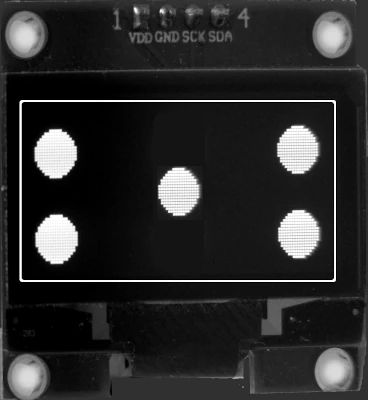
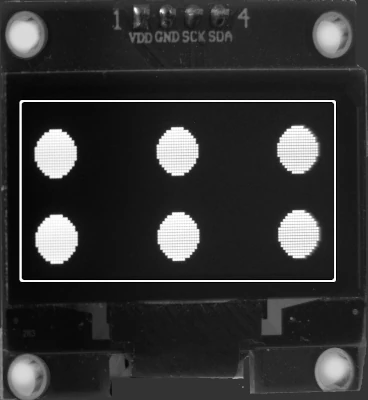
Die Würfelaugen:
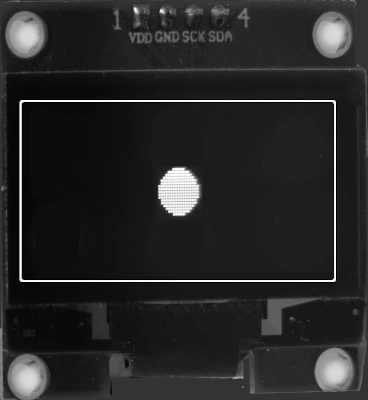 | 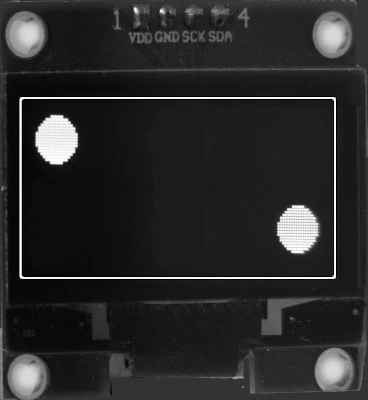 | 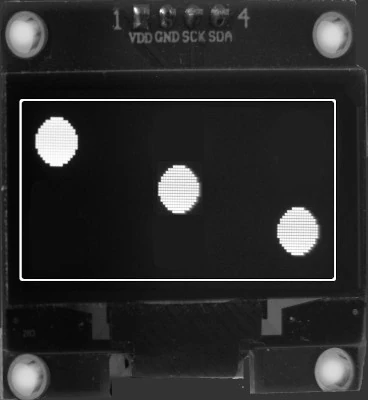 | 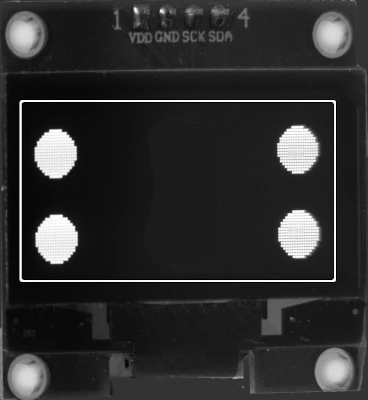 |  |  |
So sieht es aus:
Benötigte Bauteile
- Taster
- alternativ: Vibrationssensor oder Berührungssensor
- OLED-Display
- Leitungsdrähte
Der Schaltplan
(Fahre mit der Maus über das Bild, um die Bezeichnungen der Bauteile zu sehen)
Die Hardware

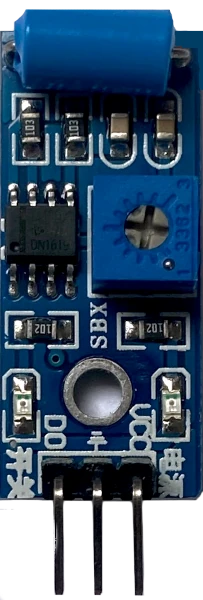
Der Vibrationssensor sendet ein HIGH-Signal wenn er bewegt wird.
Das Programm
Erläuterungen
- Für die Ausführung der Programm spielt die Auflösung der OLEDs keine Rolle:
getDisplayWidth() und getDisplayHeight() stellt die Maße fest und positioniert den Rahmen und die Würfelaugen entsprechend - im Kopf des Programm musst du die Kommentarzeichen (//) vor dem verwendeten OLED entfernen
- die Variable Radius bestimmt die Größe der Kreise
Benötigte Bibliotheken
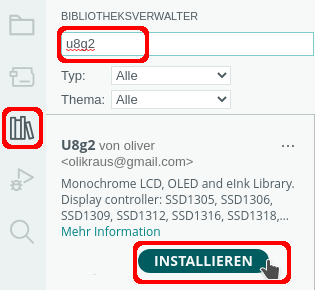 |  |
oder: Sketch -> Bibliothek einbinden -> Bibliotheken verwalten
⇒Funktionen der Bibilothek u8g2
Mit Taster oder Berührungssensor
Binde die benötigten Bibliotheken ein und definiere die Variablen. Lege das verwendete Display fest:
|
1 2 3 4 5 6 7 8 9 10 11 12 13 14 15 16 17 18 19 20 21 22 23 24 25 26 27 28 29 30 |
#include "U8g2lib.h" #include "Bounce2.h" int Minimum = 1; int Maximum = 7; int TASTER = 7; /* OLED initialisieren Typbezeichnung mit Bildschirmgröße in Pixeln 1 = Page Buffer Mode Hardware I2C Name des OLEDs */ // 0,96 Zoll SSD1306 // U8G2_SSD1306_128X64_NONAME_1_HW_I2C oled(U8G2_R0, U8X8_PIN_NONE); // 1,3 Zoll SH1106 // U8G2_SH1106_128X64_NONAME_1_HW_I2C oled(U8G2_R0, U8X8_PIN_NONE); // 1,5 Zoll SH1107 Page Buffer Mode // U8G2_SH1107_SEEED_128X128_1_HW_I2C oled(U8G2_R0); // 1,54 Zoll CH1106 (SSD1309) Page Buffer Mode // U8G2_SSD1309_128X64_NONAME0_1_HW_I2C oled(U8G2_R0); // Bounce initialisieren Bounce Wuerfel = Bounce(); int Radius = 5; |
Der setup-Teil:
|
1 2 3 4 5 6 7 8 9 10 11 12 13 14 15 16 17 18 19 20 21 22 23 24 25 26 27 28 29 30 |
void setup() { pinMode(TASTER, INPUT_PULLUP); // Taster Bounce zuordnen Wuerfel.attach(TASTER); Wuerfel.interval(20); oled.begin(); // Zufallsgenerator starten randomSeed(analogRead(A0)); // Farbe weiß oled.setDrawColor(1); // Position 90 Grad oled.clearDisplay(); oled.setFont(u8g2_font_t0_22_te); // Hinweis anzeigen oled.firstPage(); do { oled.drawStr(2, 20, "Start"); oled.drawStr(2, 40, "->"); oled.drawStr(2, 60, "Taste"); } while (oled.nextPage()); } |
Im loop-Teil wird die Funktion Wuerfeln() aufgerufen:
|
1 2 3 4 5 6 7 8 9 10 11 12 13 14 15 16 17 18 19 20 21 22 23 24 25 26 27 28 29 30 31 32 33 34 35 36 37 38 39 40 41 42 43 44 45 46 47 48 49 50 51 52 53 54 55 56 57 58 59 60 61 62 63 64 65 66 67 68 69 70 71 72 73 74 75 76 77 78 79 80 81 82 83 84 85 86 87 88 |
void Wuerfeln() { int Zahl = random(Minimum, Maximum); oled.firstPage(); // Würfelaugen zeichnen // 1 if (Zahl == 1) { do { oled.drawRFrame(0, 0, oled.getDisplayWidth(), oled.getDisplayHeight(), 5); oled.drawDisc(oled.getDisplayWidth() / 2, oled.getDisplayHeight() / 2, Radius); } while (oled.nextPage()); } // 2 if (Zahl == 2) { do { oled.drawRFrame(0, 0, oled.getDisplayWidth(), oled.getDisplayHeight(), 5); oled.drawDisc(14, 14, Radius); oled.drawDisc(oled.getDisplayWidth() - 15, oled.getDisplayHeight() - 15, Radius); } while (oled.nextPage()); } // 3 if (Zahl == 3) { do { oled.drawRFrame(0, 0, oled.getDisplayWidth(), oled.getDisplayHeight(), 5); oled.drawDisc(14, 14, Radius); oled.drawDisc(oled.getDisplayWidth() / 2, oled.getDisplayHeight() / 2, Radius); oled.drawDisc(oled.getDisplayWidth() - 15, oled.getDisplayHeight() - 15, Radius); } while (oled.nextPage()); } // 4 if (Zahl == 4) { do { oled.drawRFrame(0, 0, oled.getDisplayWidth(), oled.getDisplayHeight(), 5); oled.drawDisc(14, 14, Radius); oled.drawDisc(oled.getDisplayWidth() - 15, 14, Radius); oled.drawDisc(14, oled.getDisplayHeight() - 15, Radius); oled.drawDisc(oled.getDisplayWidth() - 15, oled.getDisplayHeight() - 15, Radius); } while (oled.nextPage()); } // 5 if (Zahl == 5) { do { oled.drawRFrame(0, 0, oled.getDisplayWidth(), oled.getDisplayHeight(), 5); oled.drawDisc(14, 14, Radius); oled.drawDisc(oled.getDisplayWidth() / 2, oled.getDisplayHeight() / 2, Radius); oled.drawDisc(oled.getDisplayWidth() - 15, 14, Radius); oled.drawDisc(14, oled.getDisplayHeight() - 15, Radius); oled.drawDisc(oled.getDisplayWidth() - 15, oled.getDisplayHeight() - 15, Radius); } while (oled.nextPage()); } // 6 if (Zahl == 6) { do { oled.drawRFrame(0, 0, oled.getDisplayWidth(), oled.getDisplayHeight(), 5); oled.drawDisc(14, 14, Radius); oled.drawDisc(oled.getDisplayWidth() / 2, 14, Radius); oled.drawDisc(oled.getDisplayWidth() - 15, 14, Radius); oled.drawDisc(14, oled.getDisplayHeight() - 15, Radius); oled.drawDisc(oled.getDisplayWidth() / 2, oled.getDisplayHeight() - 15, Radius); oled.drawDisc(oled.getDisplayWidth() - 15, oled.getDisplayHeight() - 15, Radius); } while (oled.nextPage()); } } |
Der loop-Teil:
|
1 2 3 4 5 6 7 8 9 10 11 12 13 14 15 16 17 |
void loop() { if (Wuerfel.update()) { if (Wuerfel.read() == LOW) { // Würfeleffekt: Zufallszahlen in schneller Folge anzeigen for (int i = 0; i < 5; i++) { int Zahl = random(Minimum, Maximum); Wuerfeln(); delay(50); } } } } |
Mit Vibrationssensor
|
1 2 3 4 5 6 7 8 9 10 11 12 13 14 15 16 17 18 19 20 21 22 23 24 25 26 27 28 29 30 31 32 33 34 35 36 37 38 39 40 41 42 43 44 45 46 47 48 49 50 51 52 53 54 55 56 57 58 59 60 61 62 63 64 65 66 67 68 69 70 71 72 73 74 75 76 77 78 79 80 81 82 83 84 85 86 87 88 89 90 91 92 93 94 95 96 97 98 99 100 101 102 103 104 105 106 107 108 109 110 111 112 113 114 115 116 117 118 119 120 121 122 123 124 125 126 127 128 129 130 131 132 133 134 135 136 137 138 139 140 141 142 143 144 145 146 147 148 149 150 151 152 153 154 155 156 157 158 159 160 161 162 163 164 165 166 167 168 169 170 171 172 173 |
#include "U8g2lib.h" #include "Bounce2.h" int Minimum = 1; int Maximum = 7; int Sensor = 7; /* OLED initialisieren Typbezeichnung mit Bildschirmgröße in Pixeln 1 = Page Buffer Mode Hardware I2C Name des OLEDs */ // 0,96 Zoll SSD1306 // U8G2_SSD1306_128X64_NONAME_1_HW_I2C oled(U8G2_R0, U8X8_PIN_NONE); // 1,3 Zoll SH1106 // U8G2_SH1106_128X64_NONAME_1_HW_I2C oled(U8G2_R0, U8X8_PIN_NONE); // 1,5 Zoll SH1107 Page Buffer Mode // U8G2_SH1107_SEEED_128X128_1_HW_I2C oled(U8G2_R0); // 1,54 Zoll CH1106 (SSD1309) Page Buffer Mode // U8G2_SSD1309_128X64_NONAME0_1_HW_I2C oled(U8G2_R0); // Bounce initialisieren Bounce Wuerfel = Bounce(); int Radius = 5; void setup() { pinMode(Sensor, INPUT_PULLUP); // Taster Bounce zuordnen Wuerfel.attach(Sensor); Wuerfel.interval(20); oled.begin(); // Zufallsgenerator starten randomSeed(analogRead(A0)); // Farbe weiß oled.setDrawColor(1); // Position 90 Grad oled.clearDisplay(); oled.setFont(u8g2_font_t0_22_te); oled.enableUTF8Print(); // Hinweis anzeigen oled.firstPage(); do { oled.setCursor(10, 20); oled.print("Start"); oled.setCursor(10, 40); oled.print("->"); oled.setCursor(10, 60); oled.print("Schütteln"); } while (oled.nextPage()); } void Wuerfeln() { int Zahl = random(Minimum, Maximum); oled.firstPage(); // Würfelaugen zeichnen // 1 if (Zahl == 1) { do { oled.drawRFrame(0, 0, oled.getDisplayWidth(), oled.getDisplayHeight(), 5); oled.drawDisc(oled.getDisplayWidth() / 2, oled.getDisplayHeight() / 2, Radius); } while (oled.nextPage()); } // 2 if (Zahl == 2) { do { oled.drawRFrame(0, 0, oled.getDisplayWidth(), oled.getDisplayHeight(), 5); oled.drawDisc(14, 14, Radius); oled.drawDisc(oled.getDisplayWidth() - 15, oled.getDisplayHeight() - 15, Radius); } while (oled.nextPage()); } // 3 if (Zahl == 3) { do { oled.drawRFrame(0, 0, oled.getDisplayWidth(), oled.getDisplayHeight(), 5); oled.drawDisc(14, 14, Radius); oled.drawDisc(oled.getDisplayWidth() / 2, oled.getDisplayHeight() / 2, Radius); oled.drawDisc(oled.getDisplayWidth() - 15, oled.getDisplayHeight() - 15, Radius); } while (oled.nextPage()); } // 4 if (Zahl == 4) { do { oled.drawRFrame(0, 0, oled.getDisplayWidth(), oled.getDisplayHeight(), 5); oled.drawDisc(14, 14, Radius); oled.drawDisc(oled.getDisplayWidth() - 15, 14, Radius); oled.drawDisc(14, oled.getDisplayHeight() - 15, Radius); oled.drawDisc(oled.getDisplayWidth() - 15, oled.getDisplayHeight() - 15, Radius); } while (oled.nextPage()); } // 5 if (Zahl == 5) { do { oled.drawRFrame(0, 0, oled.getDisplayWidth(), oled.getDisplayHeight(), 5); oled.drawDisc(14, 14, Radius); oled.drawDisc(oled.getDisplayWidth() / 2, oled.getDisplayHeight() / 2, Radius); oled.drawDisc(oled.getDisplayWidth() - 15, 14, Radius); oled.drawDisc(14, oled.getDisplayHeight() - 15, Radius); oled.drawDisc(oled.getDisplayWidth() - 15, oled.getDisplayHeight() - 15, Radius); } while (oled.nextPage()); } // 6 if (Zahl == 6) { do { oled.drawRFrame(0, 0, oled.getDisplayWidth(), oled.getDisplayHeight(), 5); oled.drawDisc(14, 14, Radius); oled.drawDisc(oled.getDisplayWidth() / 2, 14, Radius); oled.drawDisc(oled.getDisplayWidth() - 15, 14, Radius); oled.drawDisc(14, oled.getDisplayHeight() - 15, Radius); oled.drawDisc(oled.getDisplayWidth() / 2, oled.getDisplayHeight() - 15, Radius); oled.drawDisc(oled.getDisplayWidth() - 15, oled.getDisplayHeight() - 15, Radius); } while (oled.nextPage()); } } void loop() { if (Wuerfel.update()) { if (Wuerfel.read() == LOW) { // Würfeleffekt: Zufallszahlen in schneller Folge anzeigen for (int i = 0; i < 5; i++) { int Zahl = random(Minimum, Maximum); Wuerfeln(); delay(50); } } } } |


Ähnliche Projekte
- Laplace-Versuch
- LED-Matrix Würfeln
- Lottozahlen – Anzeige auf einem LCD
- Lottozahlen mit einem Ethernet-Shield
- Lottozahlen mit WiFi und NTP
- Lottozahlen – Anzeige auf einem OLED-Display
- Lottozahlen auf eine SD-Karte schreiben
- Lottozahlen mit Zeitstempel anzeigen und auf einer SD-Karte speichern
- Schneckenrennen im Seriellen Monitor
- Würfeln einstellige 7-Segment-Anzeige und Fernbedienung
Letzte Aktualisierung: